Follow this procedure to export your grades from Blackboard.
1. This guide assumes that you are currently logged into the ATIS-CTE environment and in the Topic/Course you wish in import the question banks into. Click the + Add an activity or Resource button, and choose to the Quiz.


2.Give the exam a name, and use the New Quiz canvas to add any additional information you wish. Then hit the Save and Return button.
3.Click on the name of your new test again and ensure that your Edit Mode is on, click the Question Bank tab. Then from the box that says Questions, select Import.
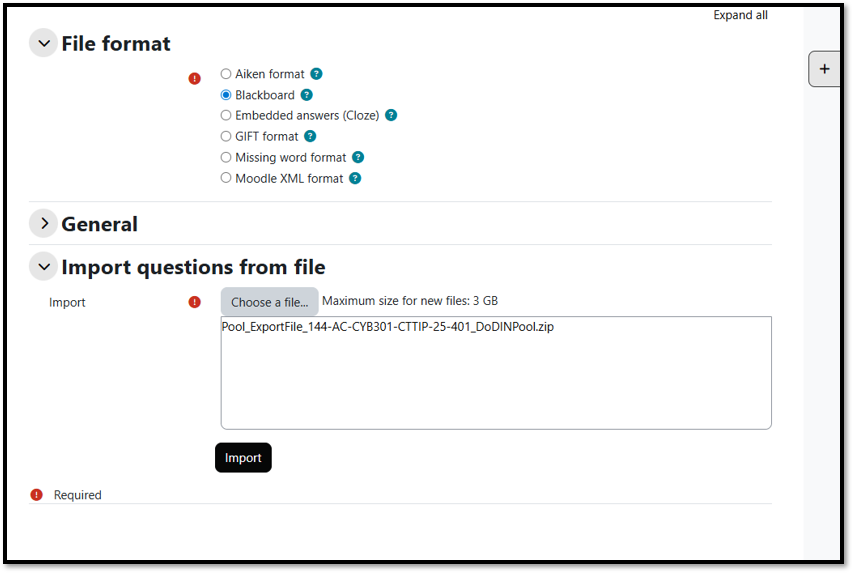
5. Verify that the questions have been imported and hit the Continue button.

6. Next you will need to add the question you imported from Blackboard into the exam. You can do this by, going back into the quiz if you were taken out after the previous step, clicking the Questions tab. Click the Add question and on the next screen hit the drop down next to Add. Choose + from question bank if you imported a test or + a random question if you are importing a Pool.

7. On the Type or Select box, hit the drop down arrow and select the name of the Pool or Test that you imported (it should show the number of questions that the package contained). Once selected, choose the questions to add to the new quiz or if you are imported a pool select the number of questions to import and click Add selected to save your work.


If you have any questions or require any additional assistance, please contact the CYBER COE LLC Support Desk:
For immediate phone assistance call: (762) 218-2660 (DSN 780-2447)
E-mail the Support Desk: usarmy.gordon.cyber-coe.mbx.lwn-llc@army.mil